

The transition from paper-based to digital document management is essential for businesses aiming to improve efficiency, security, and accessibility. However, digitising paper documents requires careful planning to ensure no data is lost during the process. This guide outlines the steps, risks, and benefits of digitisation, alongside strategies to maintain data integrity and security.

There are numerous advantages to switching to a digital document management system:
Faster Document Retrieval and Searchability
One of the greatest benefits of digitising documents is the ability to retrieve files quickly. A digital system allows employees to search for documents within seconds, speeding up workflows and increasing productivity.
Though paper-based systems have been the norm for decades, they pose significant risks to business productivity and security.
Storage Limitations and High Costs
Storing paper documents takes up valuable office space, which is expensive over time. Files need to be organized and archived, often resulting in a need for physical storage systems that require maintenance. Additionally, the ongoing cost of paper, ink, and filing supplies can add up.
Security Vulnerabilities and Data Loss Risks
Paper documents are vulnerable to theft, damage, or loss. Natural disasters, fires, or simple misplacement of files can result in irretrievable data loss. These risks can lead to business interruptions, data breaches, and regulatory compliance issues. Moreover, tracking who has accessed sensitive documents is much more challenging with paper files.
Inefficient Workflows and Productivity Challenges
Paper-based systems slow down workflows. Employees need to manually retrieve, read, and process physical documents, which delays decision-making and creates operational inefficiencies. Additionally, manual processes leave room for human error, further hindering productivity.
There are numerous advantages to switching to a digital document management system:
Faster Document Retrieval and Searchability
One of the greatest benefits of digitising documents is the ability to retrieve files quickly. A digital system allows employees to search for documents within seconds, speeding up workflows and increasing productivity.

There are numerous advantages to switching to a digital document management system:
Faster Document Retrieval and Searchability
One of the greatest benefits of digitising documents is the ability to retrieve files quickly. A digital system allows employees to search for documents within seconds, speeding up workflows and increasing productivity.
Enhanced Security and Regulatory Compliance
Digital documents offer stronger security controls. Data can be encrypted, access can be limited to authorized personnel, and audit trails can track any changes made. In addition, digital documents can be backed up easily, ensuring business continuity in case of an emergency. Digital systems also help ensure compliance with data protection regulations like GDPR and HIPAA.
Seamless Remote Access and Collaboration
With digital documents, employees can access files remotely, promoting flexible working arrangements. Teams in various locations can collaborate effortlessly, sharing, editing, and discussing documents without the need for physical meetings or mailing copies.
Document Scanning: Choosing the Right Approach
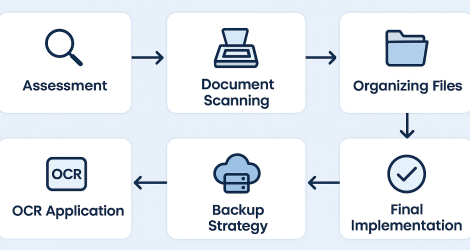
The scanning process is essential in transitioning from paper to digital documents. The best approach depends on the volume and complexity of your documents.
Bulk Scanning vs. On-Demand Scanning
For large volumes of documents, bulk scanning is more efficient. This approach uses high-speed scanners to digitise multiple documents quickly. On the other hand, on-demand scanning is ideal for businesses with smaller amounts of paperwork, where documents are scanned as needed.
High-Resolution Scanning for Clarity and OCR Compatibility
For documents that will be converted into searchable text using Optical Character Recognition (OCR), it’s crucial to use high-resolution scanning. Clear scans ensure that the OCR process works accurately, making your documents more searchable and accessible.
Selecting the Best Document Scanners and Software
Choosing the right scanners and software is essential for a smooth transition. Look for scanners with high resolution, fast processing speeds, and OCR compatibility. Additionally, your document management software should offer robust security features, be scalable for future needs, and allow easy document retrieval and sharing.
Organizing and Categorizing Files in the Digital System
Proper organization is key to a seamless digital transition.
Naming Conventions and Metadata Tagging
Establish consistent naming conventions for files to ensure they are easily searchable. Metadata tagging allows documents to be categorized based on keywords or attributes, which further aids in the retrieval process.
Structuring Digital Folders for Easy Access
After scanning, organize digital files in a clear, logical folder structure. Group files by department, project, or document type to make it easier for employees to find what they need.
Ensuring Compliance with Industry Standards
Certain industries require adherence to specific regulations for data storage and management. Ensure the digital system you implement meets these standards to avoid compliance issues. For instance, healthcare organizations must adhere to HIPAA, while financial institutions may need to comply with SOX.
Once documents are digitised, maintaining data integrity is essential.
OCR technology converts scanned images into searchable text, making documents more accessible. It helps employees locate information quickly and efficiently within the document. OCR is especially useful when dealing with scanned paper documents that contain critical information that needs to be easily retrieved.
Backing up documents ensures their protection. Cloud storage solutions provide automatic backups, protecting data from loss. Cloud platforms also allow easy access from any location, enhancing collaboration and business continuity. Ensure that your cloud provider offers strong encryption to safeguard sensitive data.
Digital documents are vulnerable to cyber threats, so it’s vital to implement robust cybersecurity measures. Data encryption, secure logins, and firewalls will protect sensitive information from unauthorized access. Adopting data protection practices such as regular security audits is crucial to maintaining a safe environment.
While transitioning from paper to digital is beneficial, there are challenges to overcome:
Avoiding Data Loss During the Transition
Ensuring no data is lost during the transition requires careful planning.
Best Practices for Handling Fragile or Old Documents
Old or fragile documents need special attention. Use specialized equipment designed to handle delicate materials to prevent damage during scanning.
Quality Control Measures for Accurate Digital Copies
To ensure the accuracy of digital copies, implement quality control checks. Verify that documents are scanned clearly and that OCR technology has captured the text correctly.
Implementing a Verification and Review Process
Set up a review process after scanning to ensure the digital copies are accurate. This step helps identify errors early, reducing the chances of lost or incorrect information.
Managing Employee Adoption and Training
Employee buy-in and training are critical to a successful transition.
Educating Staff on Digital File Management
Train staff on how to manage digital files effectively, including naming conventions and file categorization. The more employees understand the benefits of the new system, the easier the transition will be.
Selecting User-Friendly Document Management Software
Opt for document management software that is easy to use. User-friendly systems ensure smoother adoption and fewer operational disruptions.
Encouraging a Paperless Office Culture
Promote the benefits of going paperless, such as reducing clutter and improving collaboration. Incentivize employees to embrace digital tools, helping to foster a paperless office culture.
Digitising paper documents is no longer optional; it’s essential for businesses that want to stay competitive in the digital age. By following the steps outlined in this guide, businesses can ensure a smooth transition without losing data, while enjoying the benefits of enhanced security, greater efficiency, and improved collaboration.
Taking the First Step Toward a Digital Future
Start by evaluating your current document management system. Identify areas for improvement, invest in the right technology, and create a plan to digitise critical documents. A clear, structured approach will ensure the transition is seamless.
How to Start the Transition Process
Begin by scanning and organizing essential documents such as contracts, legal agreements, and financial records. Focus on high-volume areas first to experience the immediate benefits of digitisation.
Evaluating ROI and Long-Term Benefits
While the initial costs of digitisation may seem high, the long-term benefits—such as reduced storage costs, improved workflow efficiency, and better data security—far outweigh the investment. The transition to digital will set your business up for success in the future.
At American Business Solutions, we specialise in guiding businesses through a smooth transition from paper to digital documentation. Our ISDOCS DMS ensures your data remains secure, searchable, and easy to access, helping you improve efficiency and meet compliance standards.
Get started with a free consultation today!